Turbo Stars - Rival Racing
- 4.6
- Rating
- 100.00M
- Installs
- Free
- Price
 Analysis by App-foxy
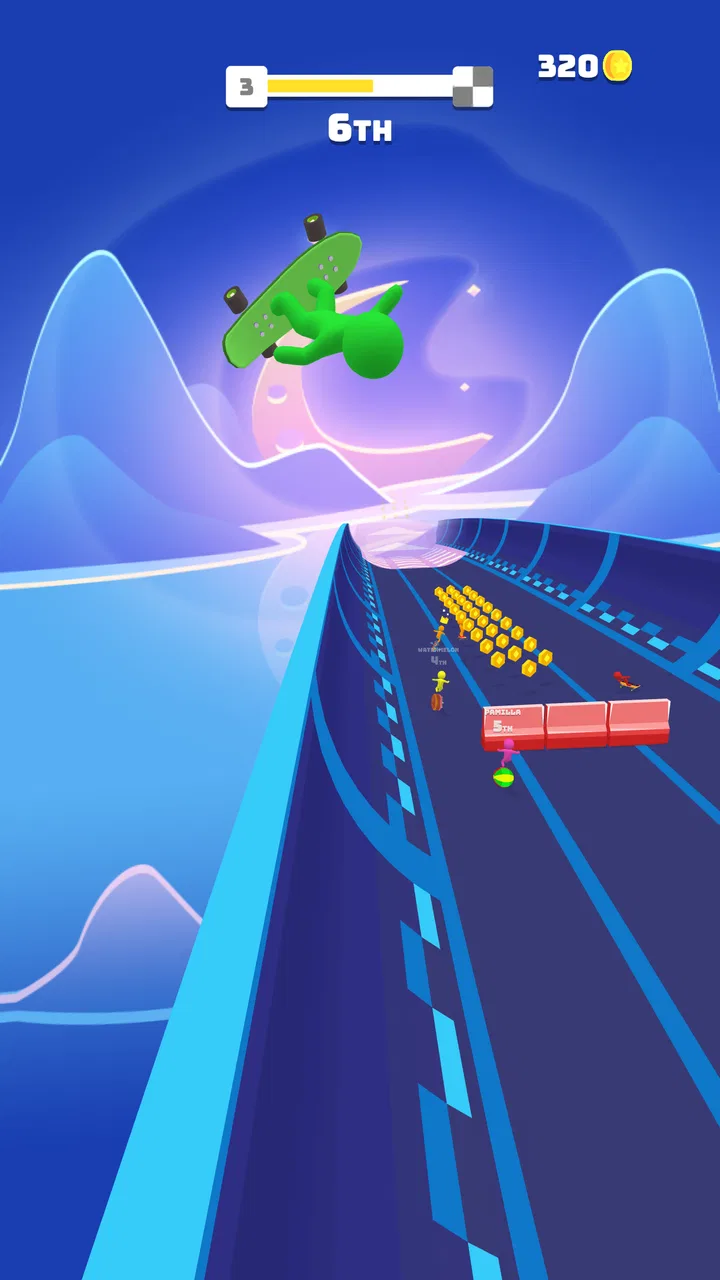
I approached Turbo Stars - Rival Racing expecting a quick racing game rather than a serious driving simulator, and that is exactly where it works best. It is a free racing game from SayGames Ltd that turns short sessions into simple, energetic contests. The controls are easy to understand, but the timing behind them takes more attention than the first few races suggest. I found myself enjoying it most when I wanted something I could start immediately, play with one hand, and put down without losing a long story or complicated setup.
The game is aimed at everyone, and its broad appeal is easy to understand. You race across varied tracks, try to stay ahead of opponents, and react to the course instead of managing a large collection of simulation settings. That makes it approachable for younger players and casual users, while the quick restarts give experienced mobile players a reason to keep trying. Still, its simplicity is also its main limitation: anyone looking for realistic vehicle handling, deep tuning, or a substantial career mode may find the experience too light.
What the first races feel like
The opening experience is built around immediate movement rather than lengthy preparation. I did not need to learn a complicated menu system before reaching the action. The important early lesson is that winning is less about holding a direction constantly and more about making small corrections at the right time. A wide track can make the game look forgiving, but poor positioning before a bend or obstacle can quickly cost the lead.
You May Also Like

 AccuWeather: Weather Radar
AccuWeather Review: A Quick, Clear Forecast for Everyday Decisions
For everyday plans, the best forecast is the one you can understand quickly. AccuWeather makes rain timing, radar, and local conditions easy to act on, with a few trade-offs.

 Hill Climb Racing
Why Hill Climb Racing Still Turns Crashes Into One More Run
A tiny car, a bumpy hill and one more upgrade: Hill Climb Racing keeps resurfacing because its simple chaos makes every near-miss feel personal.

 AliExpress - Shopping App
AliExpress Makes Global Shopping Feel Personal, but Shoppers Bear the Risk
AliExpress turns a global marketplace into a pocket-sized discovery engine. Its reach is useful, its shopping loop compelling, and its trade-offs easy to miss.

 Lords Mobile: Kingdom Wars
Lords Mobile Is a Kingdom-Building Routine, Not a Quick Match
A case-by-case verdict on the building, battles, device demands, and social commitments that make Lords Mobile rewarding for some players and exhausting for others.

 PDF Scanner app - TapScanner
TapScanner Makes Paperwork Easier to Capture, Check, and Share
TapScanner makes scanning with a phone feel less like a rescue operation and more like a dependable step in getting work done. Its capture tools are useful, though not flawless.

 Block Blast!
 Shows How Much a Puzzle Game Can Leave Out
A quiet grid game shows why puzzle players increasingly value instant clarity, repeatable skill and low-pressure play—and where the genre still needs to catch up.
More From Our News Desk
View All News


That is one of the places where new players can get stuck. The controls appear simple enough to invite careless swiping or steering, yet the best results come from watching the track ahead and anticipating the next change. If I waited until the last moment to correct my line, I often created a second problem by overcorrecting. A lighter touch generally worked better than trying to force the racer from one side to the other.
The opponents also affect how I judge a race. I do not treat every setback as a sign that the game is unfair. Sometimes the real issue is entering a section of track from the wrong position, leaving too little room to recover. When a race goes badly, restarting with a different opening line is more useful than repeating the same movement and hoping the result changes.
For a short mobile session, this design is effective. A spare moment while waiting for an appointment can turn into a few races without demanding a large time commitment. On the other hand, the same quick-loop structure can feel repetitive if I play for a long stretch. The game is strongest in bursts, especially when I focus on improving my approach to a particular type of track rather than expecting every race to feel dramatically different.
Where setup and access can cause confusion
Before judging the racing itself, I would check whether the device is suitable. The current version is 1.8.52 and requires Android 8.0 or later. That requirement is not especially demanding, but an older phone can still struggle if its operating system has not been updated or if storage is nearly full. A failed installation, a stalled update, or an app that closes unexpectedly is not automatically a gameplay problem.
The game is free to install, with optional in-app purchases priced from $2.49 to $3.49 per item. I recommend deciding in advance whether you want to spend anything. That small decision prevents a casual race from turning into an unplanned purchase, particularly when a younger player is using the device. If you are reviewing the game for a child, the Everyone content rating makes it broadly accessible, but purchase supervision is still sensible.
When installation does not begin, I would first confirm that the device has enough free space and that the operating system meets the minimum requirement. I would also check the connection and restart the app store before trying again. These are ordinary checks, but they solve more problems than repeatedly tapping the install button. If the download stops at the same point, freeing space and reconnecting to a stable network is a more practical next step than changing gameplay settings.
After installation, I prefer to open the game once with other demanding apps closed. This gives the phone more room to handle the session and makes it easier to tell whether a problem belongs to the game or to the device. If the first launch takes longer than expected, I avoid repeatedly opening and closing it, because that can make a temporary loading issue harder to diagnose.
How I recover when a race or session goes wrong
My first recovery step is simple: leave the current session, close the game normally, and open it again. If the issue is a frozen screen, unresponsive input, or a race that no longer reacts correctly, restarting is usually more useful than continuing to tap. I also check whether another app is consuming the phone’s attention, especially if the device feels warm or generally sluggish.
If the game launches but the controls feel delayed, I look at the connection and the device before blaming the track. A crowded network, background downloads, or low available storage can make a mobile game feel less responsive. Moving to a more reliable connection and pausing other downloads gives a cleaner test. I would avoid immediately deleting app data, because that can remove local progress or settings and should be treated as a later troubleshooting step rather than a first reaction.
There is also a useful recovery habit inside the racing itself. When I make an early mistake, I do not spend the whole race trying to repair it with frantic movements. I watch the next safe section, regain a stable line, and then look for the next opportunity to improve. This matters because a rushed recovery often produces another collision or missed turn. The game rewards composure more than dramatic last-second gestures.
If an update is available, installing it can help with stability, but I would not assume every problem will disappear immediately. After updating, I close and reopen the game rather than jumping straight into a long session. If the issue continues only on one device, that points toward local conditions such as storage, memory, or operating-system behavior. If it appears consistently across different sessions, recording exactly when it happens makes further support much easier than describing it only as “the game is broken.”
When the game is not the real cause
Mobile racing games are sensitive to the way a phone is being used. A device with aggressive battery saving may restrict background activity or reduce performance. A phone running several heavy apps can also respond more slowly than it does after a clean restart. I do not need technical tools to test this: restart the device, close unnecessary apps, and compare one short race with the earlier experience.
Touchscreen behavior can create another false impression. A dirty screen, a thick protector, or damp fingers may make a swipe feel inconsistent. Because Turbo Stars relies on quick directional input, even a small interruption can look like a control fault. Cleaning the screen and trying a short session without pressing too hard helped me separate input problems from mistakes in timing.
Network conditions are worth considering too, particularly if a screen takes longer to load or a session behaves differently from one attempt to the next. I would test with a stable connection, then try again later rather than repeatedly restarting during a weak signal. The goal is to identify a pattern, not to assume that every delay comes from the game.
Storage is another overlooked factor. A phone can appear to have enough room for ordinary use while still becoming unreliable when updates or temporary files are involved. If the game will not update, closes during launch, or behaves strangely after a long period of low storage, clearing space elsewhere on the device is a reasonable check. I would not begin by changing unrelated settings or installing cleaning tools that create a new problem.
Small techniques that make the races more manageable
The most useful technique I found is to steer for the next section of track, not the part directly under the racer. Looking ahead gives me time to choose a line and avoid abrupt corrections. This is especially valuable on wide tracks, where the extra room can tempt me to drift without a plan. A controlled position near the useful side of the track is usually better than constant movement across the whole width.
Another practical tip is to treat early attempts as route-reading sessions. I do not measure success only by finishing first. I notice where the track forces a change in direction, where opponents tend to compress the available space, and where a mistake leaves enough room to recover. Once I understand that rhythm, later races feel less random and more like a test of preparation.
I also recommend separating device testing from skill testing. If input feels unreliable, run a brief session after restarting the phone and closing other apps. If the controls then feel normal, the earlier problem was probably environmental. If they remain inconsistent, I would examine the screen, connection, and software state before deciding that the game itself is at fault. This saves time and avoids changing habits based on a temporary performance issue.
Purchases deserve a similar practical approach. Because individual items cost between $2.49 and $3.49, I would only buy after deciding whether the game has earned a place in my regular rotation. A purchase may make sense for someone who plays often and wants to support the experience, but it is not necessary for a person who only wants occasional races. The free entry point is one of the game’s strongest advantages, so I would use it fully before spending.
For parents, the best everyday workflow is to let the child try a few supervised sessions first, then decide whether the controls and pace are suitable. The Everyone rating makes the content broadly accessible, but that does not answer whether the quick reactions are comfortable for every child. Watching how the player handles losing is useful: some will enjoy retrying, while others may become frustrated by repeated short defeats.
How it compares with other mobile racing choices
Compared with simulation-focused racers, this game asks for much less commitment. I do not need to learn braking models, adjust detailed vehicle settings, or spend time preparing a race. That makes it a better choice for a quick break, but a weaker one for someone who wants authentic driving technique or long-term customization.
It also differs from large racing games built around extensive progression systems. Those alternatives can offer more variety in vehicles, events, and goals, but they often require more storage, longer sessions, and greater patience. Turbo Stars feels more immediate. I can pick it up without remembering a complicated campaign, which is convenient when I have only a few minutes.
Arcade racing fans should understand the trade-off clearly. The accessible controls lower the barrier to entry, yet they do not create the same sense of mechanical depth as a dedicated console-style racer. If your enjoyment comes from mastering a particular car or tuning every detail, another category of game will likely suit you better. If your priority is fast, readable action with minimal preparation, this one makes more sense.
The game’s scale is reflected in its audience: it holds a 4.6 average from around one million ratings and has passed 100 million installs. Those figures suggest that the straightforward format has reached a very large mobile audience, but popularity should not replace personal fit. I still think the right question is whether you enjoy repeated short races and simple controls, not whether the install count guarantees that you will like it.
Who should install it, and who should skip it
I would recommend it to casual players who want a racing game that starts quickly, families looking for an accessible option, and anyone who enjoys improving through repeated attempts. It is also a good companion for short breaks because a session does not need to become a major commitment. The free price makes trying it low-risk, provided you keep the optional purchases in mind.
I would be more cautious if you dislike repetition or become frustrated when a simple control scheme still demands precise timing. The game can look effortless while punishing rushed decisions, and that contrast will not appeal to everyone. Players who want realistic physics, deep progression, or a broad simulation layer should choose a more specialized racing title instead.
It is also not my first choice for a long uninterrupted gaming session. After several races, the compact loop can lose some of its freshness. I get more from it when I use it as a focused arcade game: play a handful of races, notice one mistake pattern, and stop before the repetition becomes tiring. That rhythm keeps the experience enjoyable rather than turning it into background tapping.
For an ordinary day, I can imagine using it during a commute break or while waiting for food, assuming the device is charged and the connection is behaving normally. I would not choose it for a serious competitive evening or for a player who wants a story-driven racing journey. Its strengths are convenience, accessibility, and quick feedback, not depth on the scale of a full racing simulation.
My practical verdict after living with the game
Turbo Stars - Rival Racing earns its place as a convenient arcade racer because it understands the value of immediate action. I like that the basic idea is easy to grasp, while careful steering and better route reading still give me something to improve. SayGames Ltd has kept the experience approachable enough for broad audiences, and the Everyone rating supports that casual positioning.
My main advice is to treat setup and performance problems separately from racing mistakes. Check Android compatibility, free storage, connection quality, screen response, and background activity before deciding that the controls are failing. During races, look ahead, make smaller corrections, and use a restart as a chance to change your approach rather than repeat it.
The current version, 1.8.52, supports the straightforward experience I wanted from a short-session game, while the free download lets you decide for yourself without an upfront cost. Optional items from $2.49 to $3.49 are worth considering only after you know you will keep playing. In my view, it is a strong recommendation for quick arcade racing and a clear skip for simulation fans. If you want accessible races that fit into spare minutes, this is an easy one to try; if you want detailed driving depth, choose a different kind of racer.
FAQs for Turbo Stars - Rival Racing
01What are the main features of Turbo Stars - Rival Racing?
Turbo Stars - Rival Racing offers an exhilarating racing experience with stunning graphics and smooth controls. Players can customize their vehicles and characters, participate in various racing modes, and compete against players worldwide. The game also includes daily challenges and rewards, adding to its replayability.
02Is Turbo Stars - Rival Racing free to play?
Yes, Turbo Stars - Rival Racing is free to download and play. However, it does offer in-app purchases for players who wish to enhance their gaming experience. These purchases can include vehicle upgrades, cosmetic items, and additional in-game currency. Users should be mindful of these options, especially if allowing children to play.
03Does Turbo Stars - Rival Racing require an internet connection?
Turbo Stars - Rival Racing requires an internet connection for certain features such as multiplayer races and leaderboard updates. While some offline modes may be available, the full experience, including competing against others and receiving real-time updates, benefits from a stable internet connection.
04What devices are compatible with Turbo Stars - Rival Racing?
Turbo Stars - Rival Racing is available on both Android and iOS platforms. It supports a wide range of devices, but for the best experience, a device with updated software and a decent amount of RAM is recommended. Always check the app store listings for specific compatibility details before downloading.
05Are there any parental controls available in Turbo Stars - Rival Racing?
Turbo Stars - Rival Racing includes some parental control options. Parents can manage in-app purchase settings and monitor screen time through their device settings. It's advisable for parents to review these settings and discuss responsible gaming habits with their children to ensure a safe and enjoyable experience.
Pros
- Smooth and intuitive controls enhance gameplay.
- Variety of tracks keeps the game exciting.
- Customizable character skins add personalization.
- Quick loading times for a seamless experience.
- Multiplayer mode offers competitive fun.
Cons
- In-app purchases can be quite expensive.
- Ads can interrupt the gaming experience.
- Limited offline play options available.
- Graphics may not impress high-end device users.
- Energy system restricts continuous play.

Turbo Stars - Rival Racing
Gallery